

Agent
- Give an agent a brief, a folder and a memory file.
- Schedule routines for recurring work.
- Pick up results and approvals in the Inbox.

Shelzo runs the agent CLIs you already pay for — Claude Code, Codex, Cursor, Gemini and more — side by side on your Mac. Real terminals, structured chats, agents with routines.
macOS 14 or later · Apple Silicon and Intel · notarized by Apple

Each CLI keeps its own sign-in and subscription. Shelzo never proxies a token.
Shelzo is the desk your agents work at. Claude Code, Codex, Cursor and Gemini run in real terminals inside your own folders. Chats stay structured, routines keep going while you sleep, and every tool call waits for your yes — one window, and no token ever leaves its CLI.
Three modes
Three ways to work with the same engines, one sidebar that keeps track of all of it.

Around it
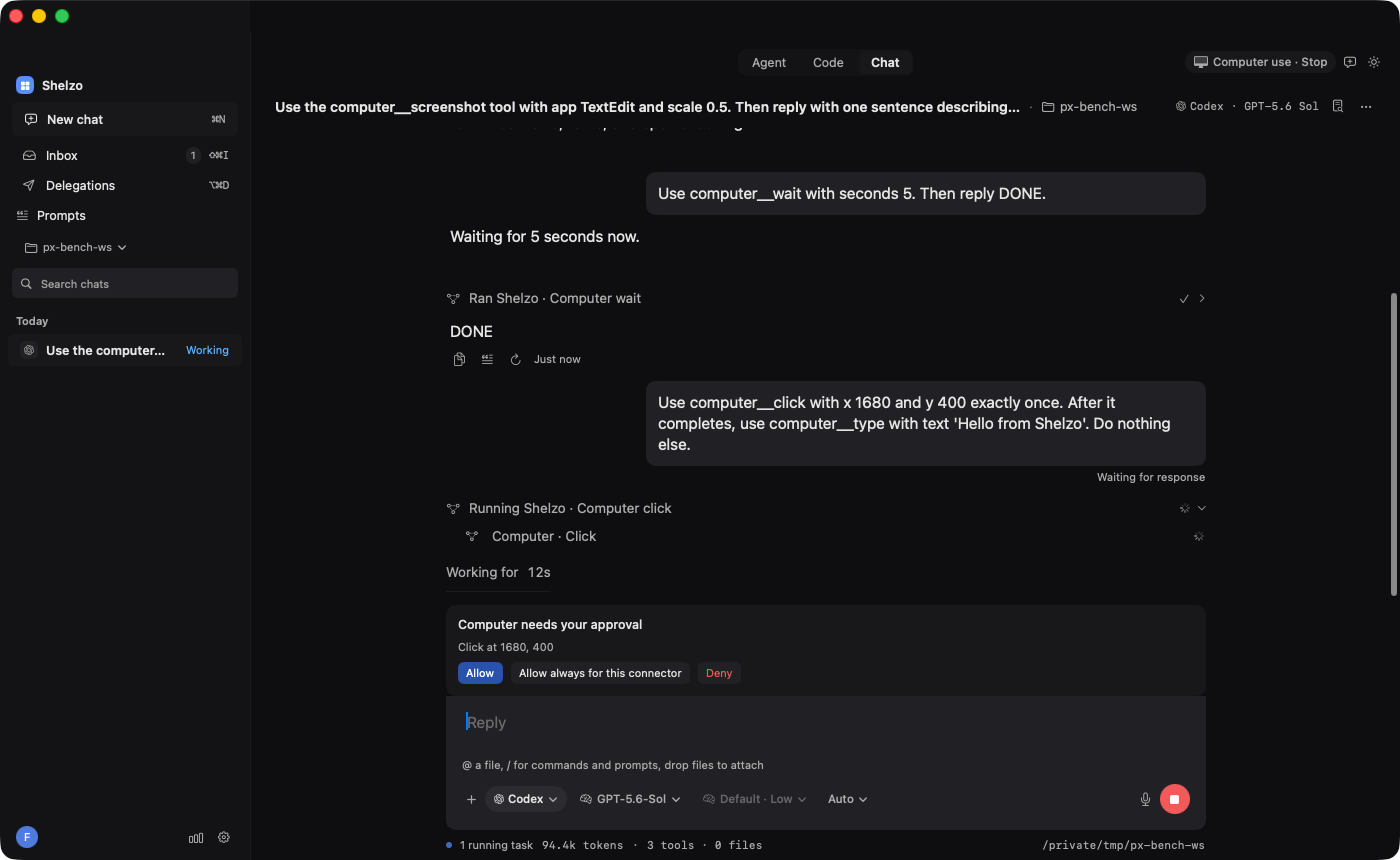
The agent sees the screen and works across apps. Every click asks first; Stop lives in the title bar.
Register an MCP server once — GitHub, Linear, Notion, Sentry, Cloudflare, Gmail — and every chat can use it. Writes go through approvals.
Open a folder on another machine. Terminals, chats and files behave as if it were local.
Hourly, daily, weekly or once. Missed runs catch up at launch, failures come with a Retry.
Tool calls, connector writes and computer actions wait for you in one place, with the arguments spelled out.
shelzo CLIStart chats, wait for answers and approve tool calls from a script. Everything stays on your Mac.
Computer use
By default the agent asks before each click, keystroke or other input. You approve or deny, one action at a time or for the session.
Stop ends computer use, cancels pending approvals and interrupts the agent's turn. ⌥⌘. does the same.
Screen Recording and Accessibility are macOS permissions. Shelzo shows what it has and where to change it.
How it works
Open the DMG and drag Shelzo to Applications. Updates arrive through the app itself.
Local or over SSH. Shelzo finds the CLIs on your PATH and shows which are signed in.
⌘N opens a chat with the engine and model as pills in the composer. Terminals are one shortcut away.
Everything is free until 1 October 2026. Pro pricing comes in October. Your engine subscriptions stay yours, in either case.
Download for macOSNo Shelzo account needed during the beta.
Not during the public beta. Your engines still use their own sign-ins and subscriptions.
macOS 14 or later, Apple Silicon and Intel.
No. The engines talk directly to their vendors under their own data policies; nothing passes through Shelzo's servers. Usage statistics are anonymous, contain no code or chat content, and can be switched off in Settings → General.
Shelzo updates itself through "Check for Updates…" in the app menu. Keep it in Applications for the built-in updater, and manage automatic checks in Settings → General → Updates. The DMG on this site is always the latest version.
The free public beta ends and Pro pricing is announced. Your engine subscriptions stay separate and remain yours.